Understand the editor screen
The editor has three zones: the vertical preview, the toolbar and the timeline.
The top bar#
- Undo and Redo step back or forward through your settings.
- The status reads Saving… then Saved.
- Shortcuts lists the keyboard keys.
- Export starts rendering the clip.
The preview#
The preview shows your clip in 9:16. Drag or pinch the preview to reframe.
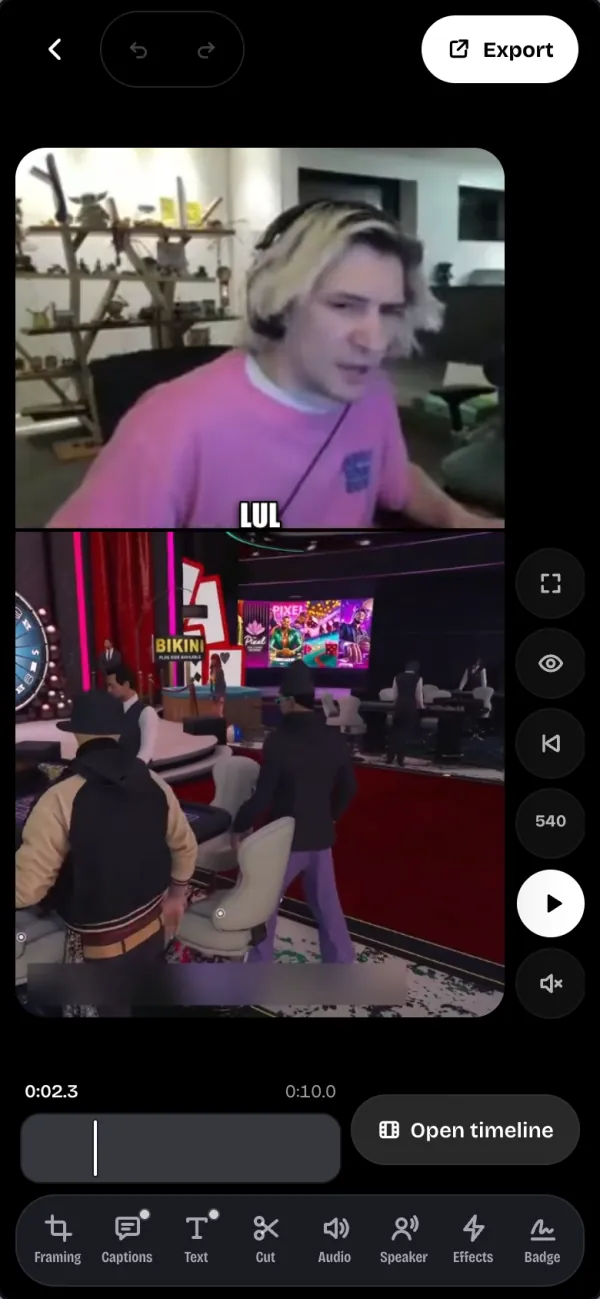
If the editor lags, lower the preview quality with the quality button (for example 540): the export stays sharp.
The toolbar#
- Framing: the layout, the cam, the zoom and the keys.
- Captions: the karaoke captions and their style.
- Text: the hook, free text and the live chat.
- Cut: cut the clip, remove a passage or change its speed.
- Audio: the clip's sound, music and sound effects.
- Speaker: follow whoever is talking.
- Effects: zooms, the opening flash, shakes and color.
- Badge: your handle and logo on the video.
The timeline#
Under the preview, the Studio Timeline shows the video, the sound, the hook, the texts and the captions. Start and End set the clip's bounds.
Cut cuts the clip at the playhead. Then tap a passage to remove it or change its speed.