Add effects and zooms
The Effects tool brings together three things: zooms on the gameplay or the cam, shakes, and color correction.
Zooms#
Place the playhead at the right moment, then tap Add a zoom at followed by the time. Each zoom can be set:
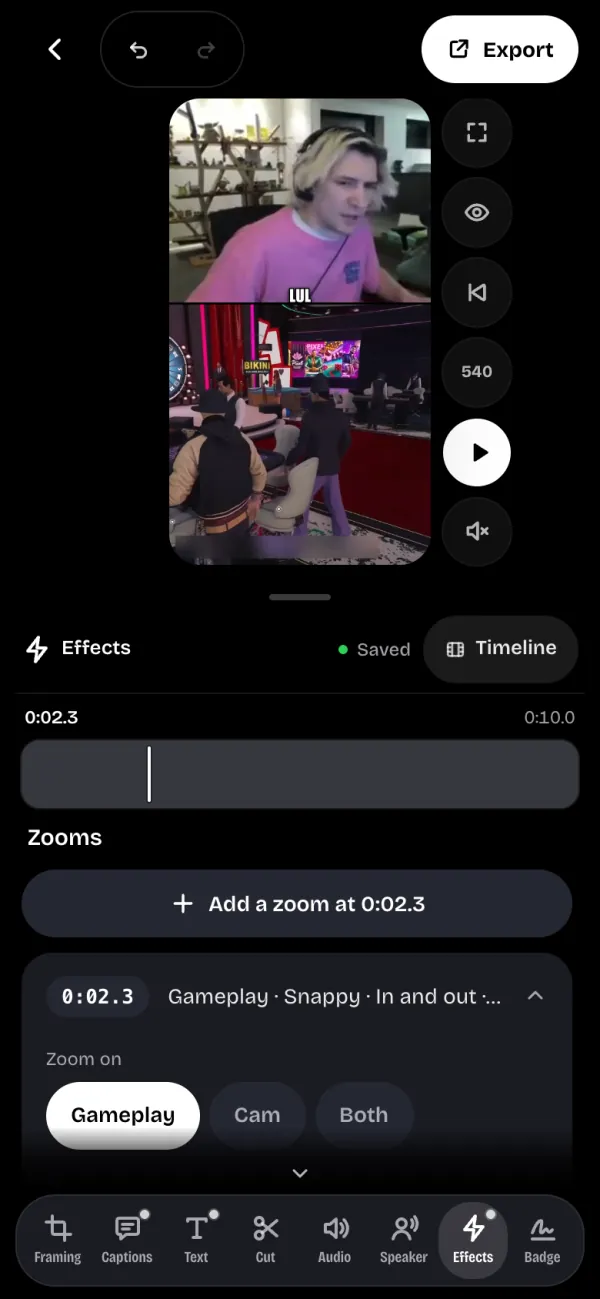
- Zoom on: the gameplay, the cam, or both.
- Type: Zoom in, Zoom out, or In then out.
- Speed: Soft, Snap, Punch or Bounce. Each tile draws its curve.
- Strength: from ×1.1 to ×2.5, and Duration: 0.5, 1, 2 or 3 s.
A clip can carry 24 zooms at most. A zoom on the cam shows nothing if no cam was found.
Shakes#
A shake makes the whole frame tremble on a hit, an explosion or a scream. Place the playhead, then tap Add a shake at followed by the time.
Set its Strength, its Speed and its Duration (0.3, 0.6, 1 or 2 s). A tile under the sliders shakes the way your clip will. A clip can carry 12 shakes.
Color#
The Color section corrects the video picture, not the text or the captions. Tap Punch for a bit more contrast and saturation in one tap, or set each slider.
- Exposure, Contrast and Saturation.
- Temperature: warmer or cooler.
- Tint: towards green or towards magenta.
The sample picture shows the before on the left and the after on the right. Reset everything undoes the correction.