Frame a clip
The studio finds the cam and composes the 9:16 for you. The Framing tool lets you change the layout and fix what it got wrong.
The cam it found#
When a webcam is found, the studio says Cam found with a confidence percentage. If the detection isn't sure, it asks you to check the framing. With no webcam found, it picks Full frame.
To fix a cam it got wrong:
- Tap Change.
- Tap Place the cam myself and draw a rectangle around the streamer's cam.
- Confirm with Use this cam.
Go back to the AI's cam undoes your rectangle. No cam: full frame is there for clips without a webcam.
The seven layouts#
Pick the layout in Framing.
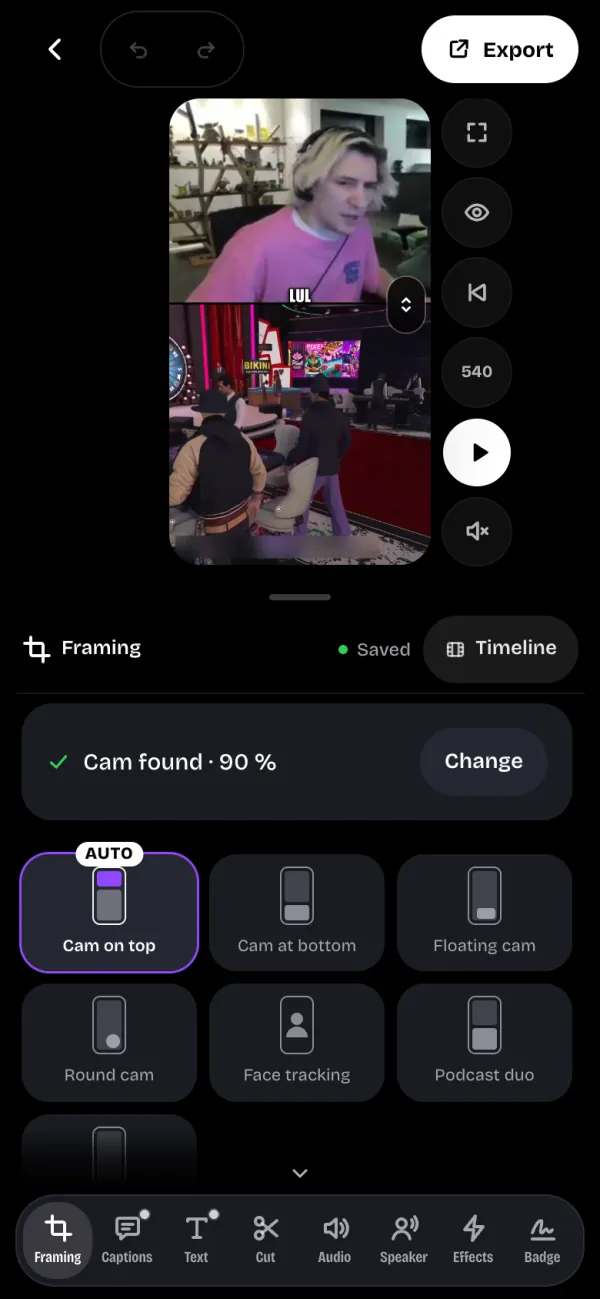
- Cam on top: the cam as a strip on top, the gameplay below.
- Cam at bottom: the gameplay on top, the cam as a strip at the bottom.
- Floating cam: the gameplay in full frame, the cam in a rounded rectangle (top right to start) that you can move and resize on the preview.
- Round cam: like the floating cam, but round.
- Face tracking: no strip, the frame follows the face of the person on the cam.
- Podcast duo: the gameplay on top and the cam at the bottom, half and half.
- Full frame: the whole picture in 9:16, with no separate cam.
With no cam detected, only the Full frame layout is possible.
Adjust the framing#
- Drag or pinch the preview to reframe.
- With Cam on top and Cam at bottom, the Cam size setting changes the height of the strip.
- In More settings, turn on Record while playing, start playback, then drag or pinch: each gesture sets a framing key for the gameplay or the cam, and the framing follows your path.
Follow who's talking#
With the Speaker tool, the studio spots faces and moving lips, cuts to the person talking and colors their captions. Tap Find who's talking.
Following applies in Full frame and Face tracking. It comes with Pro. With only one person on screen, there is nothing to follow.